Render React Components Dynamically from JSON (React.createElement Guide)
June 24, 2021 · 8 min read
Update — March 4, 2026: This post has been revised to reflect the current state of the dynamic renderer repo. Major additions include a typed action dispatch system, an
ActionContextfor dependency injection, and updated code examples throughout.
Sometimes you need to render React components dynamically from a JSON configuration instead of hardcoding them in JSX. This is common when building CMS-driven interfaces, server-defined UIs, or any scenario where the layout is determined by data at runtime.
In this guide, we'll build a dynamic renderer in React with TypeScript that reads a JSON payload and recursively creates components from it, including a typed action dispatch system to handle user interactions like button clicks, API calls, and analytics tracking.
The Problem
React normally renders components statically through JSX. But sometimes the UI structure needs to come from an API or CMS. You might receive a JSON payload describing which components to render, what props to pass, and how they nest inside each other.
The challenge is:
- Mapping JSON types to actual React components.
- Handling nested children recursively.
- Supporting user interactions (clicks, form inputs) defined in the payload.
Example JSON Payload
Here's what a typical payload looks like:
{
    "type": "Container",
    "data": {
        "id": "4400936b-6158-4943-9dc8-a04c57e1af46",
        "items": [
            {
                "type": "Card",
                "data": {
                    "id": "26b3f355-2f65-4aae-b9fd-609779f24fdd",
                    "title": "A card example",
                    "subtitle": "A subtitle",
                    "items": [
                        {
                            "type": "Button",
                            "data": {
                                "id": "btn-open",
                                "title": "Open Repo",
                                "className": "btn-primary",
                                "action": {
                                    "type": "openUrl",
                                    "url": "https://github.com/jean182/dynamic-rendering-example-react"
                                }
                            }
                        }
                    ]
                }
            },
            {
                "type": "Divider",
                "data": {
                    "id": "4400936b-6158-4943-9dc8-dsfhjs32723",
                    "marginY": 5
                }
            },
            {
                "type": "Card",
                "data": {
                    "id": "4400936b-6158-4943-9dc8-a04c57e1af46",
                    "title": "Title",
                    "headline": "Month ## - Month ##, ####",
                    "copy": "A really long text....",
                    "image": {
                        "url": "https://i.stack.imgur.com/y9DpT.jpg"
                    }
                }
            },
            {
                "type": "Container",
                "data": {
                    "id": "d76e3a5f-01ad-46f6-a45d-3ad9699ecf99",
                    "embeddedView": {
                        "type": "Input",
                        "data": {
                            "id": "26b3f355-2f65-4aae-b9fd-609779f24fdd",
                            "label": "Input",
                            "type": "password",
                            "placeholder": "Password",
                            "isRequired": false,
                            "minCharactersAllowed": 1,
                            "maxCharactersAllowed": 100,
                            "validations": [
                                {
                                    "regexType": "eightOrMoreCharacters",
                                    "regexErrorCopy": "Use 8 or more characters"
                                }
                            ]
                        }
                    }
                }
            }
        ]
    }
}
Every node has a type (the component to render) and a data object (its props). Children can appear as an items array or a single embeddedView. The action field on Button defines what happens when the user clicks it.
How React.createElement Works
The key to making this work is the React top-level API method createElement. If you're familiar with how JSX transpiles to JavaScript, you've probably seen it before:
React.createElement(
  type,       // HTML tag string, React component, or Fragment
  [props],    // Props object
  [...children] // Child elements
)
- The first argument is the element type — this can be an HTML tag like
"div"or an actual React component. - The second argument is the props object.
- The third argument is children, which is useful for wrapper components.
I recommend this reading if you want to learn more about how React handles elements under the hood.
We'll use createElement to dynamically instantiate components based on the type field from our JSON.
Creating the Component Map
First, we define the interfaces. The IComponent interface describes each node in the JSON tree:
// dynamic-rendering.interfaces.ts
import type { Action } from "../actions/actions.types";
import type { ComponentType } from "./dynamic-rendering.constants";

export interface IComponent {
  type: ComponentType;
  data: {
    id: string;
    embeddedView?: IComponent;
    items?: Array<IComponent>;
    action?: Action;
    [key: string]: unknown;
  };
}
Then we map component names to actual React components in a constants file:
// dynamic-rendering.constants.ts
import { Button, Card, Container, Divider, Input } from "../components";

export type JsonComponent = React.ComponentType<any>;

export const Components: Record<
  "Button" | "Card" | "Container" | "Divider" | "Input",
  JsonComponent
> = {
  Button,
  Card,
  Container,
  Divider,
  Input,
};

export type ComponentType = keyof typeof Components;
This gives us a type-safe lookup: when the JSON says "type": "Button", we resolve it to the actual Button component.
Action Dispatch System
The original version of this project had no way to handle user interactions defined in the JSON. Now we have a typed action dispatch system. Actions are defined as a discriminated union:
// actions.types.ts
export type Action =
  | { type: "call"; url: string; method?: "GET" | "POST"; body?: unknown }
  | { type: "openUrl"; url: string; target?: "_blank" | "_self" }
  | { type: "track"; event: string; props?: Record<string, unknown> }
  | { type: "log"; message: string; data?: unknown };

export type ActionContext = {
  request?: (args: {
    url: string;
    method: "GET" | "POST";
    body?: unknown;
  }) => Promise<unknown>;
  track?: (event: string, props?: Record<string, unknown>) => void;
  log?: (message: string, data?: unknown) => void;
};
Each action type maps to a specific behavior:
call— Makes an HTTP request (useful for API calls).openUrl— Opens a URL in a new tab.track— Fires an analytics event.log— Logs a message (useful for debugging).
The ActionContext is a small capability object that the host app provides. This keeps the renderer decoupled from specific implementations like your analytics provider or HTTP client.
The dispatcher handles each action type with a simple switch:
// actions.dispatch.ts
import type { Action, ActionContext } from "./actions.types";

export async function dispatchAction(
  action: Action | undefined,
  ctx: ActionContext = {}
): Promise<unknown> {
  if (!action) return;

  switch (action.type) {
    case "openUrl": {
      window.open(action.url, action.target ?? "_blank", "noopener,noreferrer");
      return;
    }

    case "track": {
      ctx.track?.(action.event, action.props);
      return;
    }

    case "log": {
      (ctx.log ?? console.log)(action.message, action.data);
      return;
    }

    case "call": {
      const method = action.method ?? "GET";
      if (ctx.request) {
        return ctx.request({ url: action.url, method, body: action.body });
      }

      const res = await fetch(action.url, {
        method,
        headers: action.body
          ? { "Content-Type": "application/json" }
          : undefined,
        body: action.body ? JSON.stringify(action.body) : undefined,
      });

      const contentType = res.headers.get("content-type") ?? "";
      if (contentType.includes("application/json")) return res.json();
      return res.text();
    }

    default: {
      const _never: never = action;
      return _never;
    }
  }
}
The exhaustiveness check at the bottom ensures that if you add a new action type to the union but forget to handle it here, TypeScript will catch it at compile time.
Components like Button use the dispatcher to execute their action on click:
// Button.tsx (simplified)
import type { Action, ActionContext } from "../../actions/actions.types";
import { dispatchAction } from "../../actions/actions.dispatch";

interface BtnProps {
  title: string;
  action?: Action;
  actionContext?: ActionContext;
}

export default function Button({ title, action, actionContext, ...rest }: BtnProps) {
  const onClick = async () => {
    try {
      const result = await dispatchAction(action, actionContext);
      if (result !== undefined) console.log("Action result:", result);
    } catch (e) {
      console.error("Action failed:", e);
    }
  };

  return (
    <button {...rest} onClick={onClick}>
      {title}
    </button>
  );
}
Recursive Renderer
Now we wire it all together. The createPage function takes the JSON payload and an optional actionContext, then recursively walks the tree creating React elements:
// dynamic-rendering.service.ts
import React from "react";
import type { ActionContext } from "../actions/actions.types";
import { Components } from "./dynamic-rendering.constants";
import type { IComponent } from "./dynamic-rendering.interfaces";

export function createPage(
  data?: IComponent,
  options?: { actionContext?: ActionContext }
): React.ReactNode {
  if (!data) return null;

  const actionContext = options?.actionContext;

  function createComponent(item: IComponent): React.ReactNode {
    const { data, type } = item;
    const { items, embeddedView, id, ...rest } = data;

    const props = {
      ...rest,
      key: id,
      ...(type === "Button" && actionContext ? { actionContext } : null),
    };

    const Component = Components[type];
    return React.createElement(
      Component,
      props,
      Array.isArray(items)
        ? items.map(renderer)
        : renderer(embeddedView ?? null)
    );
  }

  function renderer(config: IComponent | null): React.ReactNode {
    if (!config) return null;
    return createComponent(config);
  }

  return renderer(data);
}
Key points:
createComponentdestructuresitems,embeddedView, andidfrom the data, then spreads everything else as props.actionContextis injected into components that need it (likeButton). This keeps the JSON payload clean — it doesn't need to know about the host app's capabilities.rendereris called recursively for each child, whether it comes from theitemsarray or theembeddedViewfield.
Full Implementation
In the app entry point, you provide the action context and call createPage:
// App.tsx
import mockResponse from "./dynamic-rendering/dynamic-rendering.mock";
import { createPage } from "./dynamic-rendering";

function App() {
  const actionContext = {
    track: (event: string, props?: Record<string, unknown>) => {
      console.log("[track]", event, props);
    },
    log: (msg: string, data?: unknown) => console.log("[log]", msg, data),
  };

  return (
    <div className="my-3">
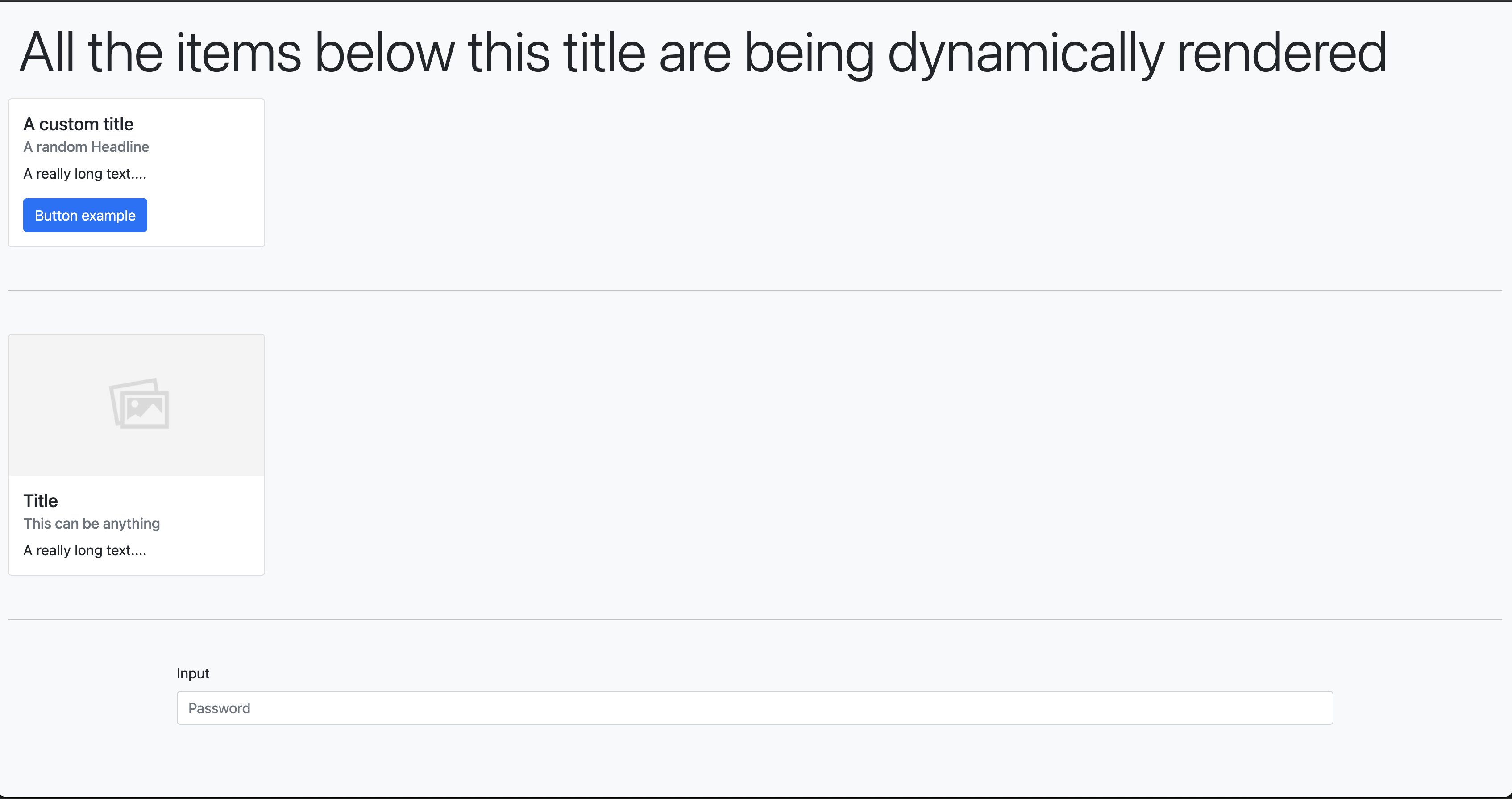
      <h1>All the items below are dynamically rendered</h1>
      {createPage(mockResponse, { actionContext })}
    </div>
  );
}

export default App;
That's it. The JSON defines the layout, the component map resolves types to real components, the recursive renderer builds the tree, and the action dispatch system handles interactions.
Final Thoughts
This pattern gives you a clean way to build server-driven or CMS-driven UIs in React. The JSON payload defines the component tree, and your React app interprets it at runtime.
The action dispatch system is what makes this practical for real applications. Without it, you can render UI but can't handle interactions. With typed actions and an injected context, your components stay decoupled and testable.
I created a working example in code sandbox if you want to see the result, and here is the GitHub repo to download the code.
Huge kudos to Daniel and Jose who helped build the original version of this in production.
Related React Guides
- React without JSX — Deep dive into
createElement. - TypeScript discriminated unions — The pattern behind the action types.
- React infinite scrolling example
- Accessible modal patterns