Building a Rails API for React: Part IV: Data Fetching
September 9, 2019 · 5 min read
Update — April 4, 2026: This post has been updated to improve clarity and structure. Key changes include refined explanations of Redux-Saga side effects, improved component organization, and updated code block formatting for better readability.
In this part of the series, we will bridge the gap between our frontend and our Rails API. Recapitulating from the previous chapter, we've already configured the API to accept requests from any origin. This allows us to run our frontend on port 3001 while simultaneously running our API on port 3000.
Folder Structure
Let's begin by creating a structured directory for our components to keep the project maintainable.
$ mkdir src/components
$ mkdir src/components/pages
$ mkdir src/components/partials
Implementing Routing
To visualize our movies, we need to implement React Router. This allows us to link components and avoid unnecessary re-renders.
yarn add react-router-dom
Next, create the router configuration file:
touch src/AppRouter.js
Add the following logic to AppRouter.js:
import React from "react"
import { Route, Switch } from "react-router-dom"
import HomePage from "./components/pages/HomePage"
import MoviePage from "./components/pages/MoviePage"

const AppRouter = () => {
  return (
    <div>
      <Switch>
        <Route exact path="/" component={HomePage} />
        <Route exact path="/movies" component={MoviePage} />
      </Switch>
    </div>
  )
}

export default AppRouter
The Home Page Component
We'll define a simple root route first:
touch src/components/pages/HomePage.js
import React from "react"

const HomePage = () => {
  return (
    <div>
      <div className="jumbotron jumbotron-fluid">
        <div className="container">
          <h1 className="display-4">Movie App</h1>
          <p className="lead">This is an App to display and create movies</p>
        </div>
      </div>
    </div>
  )
}

export default HomePage
Integrating with App.js
Update your App.js to include the provider, store, and the new router:
// Rest of the imports
import AppRouter from "./AppRouter"
import { BrowserRouter as Router } from "react-router-dom"
import { Provider } from "react-redux"

const store = setupStore()

function App() {
  return (
    <Provider store={store}>
      <Router>
        <AppRouter />
      </Router>
    </Provider>
  )
}

export default App
Managing Movie Data
Now, let's create the MoviePage component. This will be responsible for displaying the list of movies fetched from our database.
$ touch src/components/pages/MoviePage.js
Redux State Management
We need a dedicated movie reducer to handle adding, deleting, and editing movies.
touch src/redux/modules/movie.js
Define the Actions and Initial State:
import { all, put, call, takeLatest } from "redux-saga/effects"
import { handleActions, createAction } from "redux-actions"

// Actions
export const FETCH_MOVIES = "movie-frontend/movie/FETCH_MOVIES"
export const FETCH_MOVIES_SUCCEEDED = "movie-frontend/movie/FETCH_MOVIES_SUCCEEDED"
export const FETCH_MOVIES_FAILED = "movie-frontend/movie/FETCH_MOVIES_FAILED"

// Initial State
export const getInitialState = () => ({
  fetching: false,
  movies: [],
  error: null,
})
The Reducer
The reducer manages state mutations. For instance, when FETCH_MOVIES is triggered, we set fetching to true and clear any previous errors.
const movieReducer = handleActions(
  {
    [FETCH_MOVIES]: state => ({
      ...state,
      fetching: true,
      error: null,
    }),
    [FETCH_MOVIES_SUCCEEDED]: (state, action) => {
      const { data } = action.payload
      return {
        ...state,
        fetching: false,
        movies: data,
      }
    },
    [FETCH_MOVIES_FAILED]: (state, action) => ({
      ...state,
      fetching: false,
      error: action.payload,
    }),
  },
  getInitialState()
)

export default movieReducer

// Action Creators
export const requestMoviesFetch = createAction(FETCH_MOVIES)
export const succeededMoviesFetch = createAction(FETCH_MOVIES_SUCCEEDED)
export const failedMoviesFetch = createAction(FETCH_MOVIES_FAILED)
Handling Side Effects with Redux-Saga
We'll use Redux-Saga as middleware to handle asynchronous GET requests.
Defining the API Call
$ touch src/api/movie.js
import API from "./api"

export const fetchMoviesData = () => {
  return API.get("/movies/")
}
Implementing the Sagas
The fetchMoviesSaga generator function performs the API call and dispatches success or failure actions based on the result.
import { fetchMoviesData } from "../../api/movie"

export function* fetchMoviesSaga() {
  try {
    const payload = yield call(fetchMoviesData)
    yield put(succeededMoviesFetch(payload))
  } catch (error) {
    yield put(failedMoviesFetch(error.message))
  }
}

export function* movieSaga() {
  yield all([takeLatest(FETCH_MOVIES, fetchMoviesSaga)])
}
Component Refactoring
To keep things modular, we'll break down the MoviePage into smaller sub-components.
mkdir -p src/components/partials/movie
touch src/components/partials/movie/MovieList.js
touch src/components/partials/movie/MovieListItem.js
The MovieList Component
This component connects to the Redux store to fetch and display the movie data.
import React, { Component } from "react"
import { connect } from "react-redux"
import { bindActionCreators } from "redux"
import { requestMoviesFetch } from "../../../redux/modules/movie"
import MovieListItem from "./MovieListItem"

class MovieList extends Component {
  componentDidMount() {
    this.props.requestMoviesFetch()
  }

  render() {
    const { movies, fetching, error } = this.props.data
    return (
      <div>
        {fetching ? (
          <div className="d-flex align-items-center">
            <strong>Loading...</strong>
            <div className="spinner-border ml-auto" role="status" aria-hidden="true" />
          </div>
        ) : (
          <table className="table table-hover table-bordered table-responsive-sm">
            <thead>
              <tr>
                <th scope="col">Name</th>
                <th scope="col">Plot</th>
                <th scope="col">Release Date</th>
                <th scope="col">Actions</th>
              </tr>
            </thead>
            <tbody>
              {!!movies && movies.length > 0 ? (
                movies.map(movie => <MovieListItem key={movie.id} {...movie} />)
              ) : (
                <tr>
                  <th colSpan="4" className="text-center text-danger">{error}</th>
                </tr>
              )}
            </tbody>
          </table>
        )}
      </div>
    )
  }
}

const mapStateToProps = state => ({ data: state.movie })
const mapDispatchToProps = dispatch => bindActionCreators({ requestMoviesFetch }, dispatch)

export default connect(mapStateToProps, mapDispatchToProps)(MovieList)
The MovieListItem Component
import React from "react"
import { Link } from "react-router-dom"

const MovieListItem = ({ id, title, plot, releaseDate }) => (
  <tr>
    <td>
      <Link to={`/movies/${id}`}><h6>{title}</h6></Link>
    </td>
    <td>
      <p className="d-inline-block text-truncate" style={{ maxWidth: "500px" }}>{plot}</p>
    </td>
    <td><p>{releaseDate}</p></td>
    <td><Link to={`/movies/${id}/edit`}>Edit</Link></td>
  </tr>
)

export default MovieListItem
Results
If configured correctly, you should now see the data being pulled directly from your Rails API.
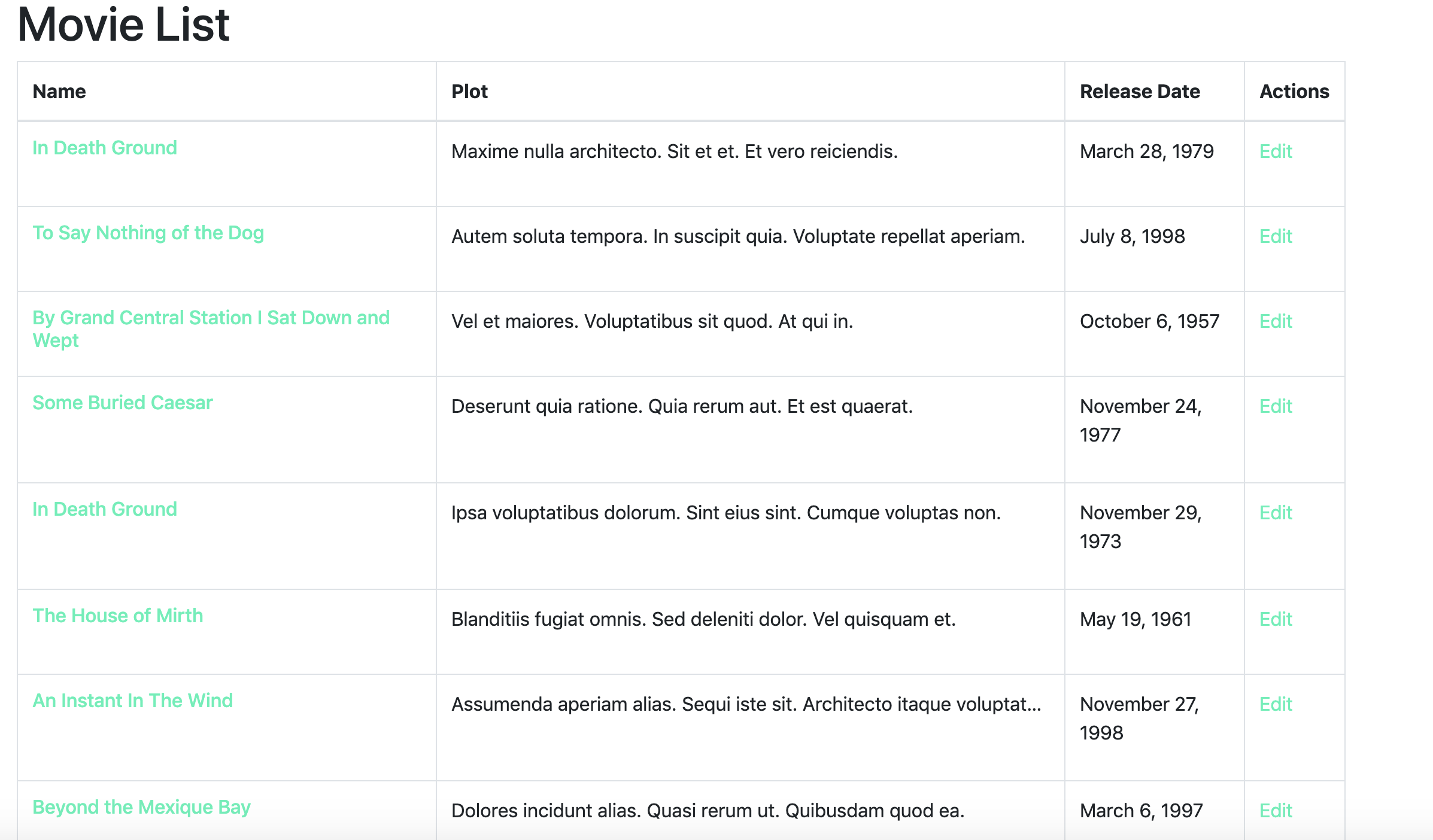
We have successfully performed our first API call! Next, we'll dive into adding, viewing, and updating specific movies. Stay tuned.