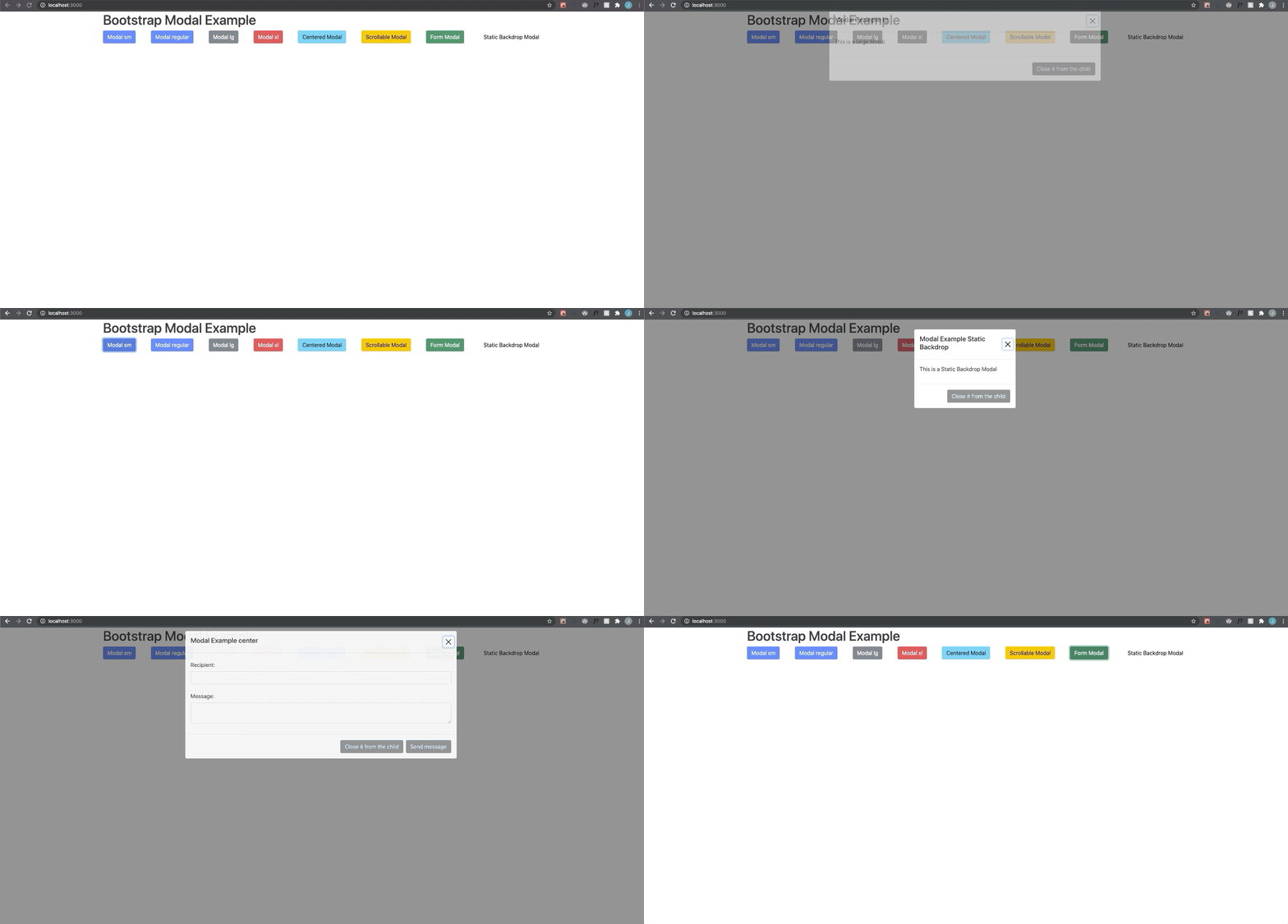
Building Accessible Modals in React with Bootstrap and Portals
March 10, 2021 · 7 min read
Update — 2026-04-04: This post has been updated to improve clarity and structure. Key changes include refined code blocks, improved accessibility explanations, and updated formatting for modern MDX standards.
I know it has been a while since I last posted anything. I've been busy lately, working a lot with React using TypeScript, along with some Prisma and NestJS on the backend. Now, let’s get started.
I'm not a huge fan of reactstrap or react-bootstrap because I enjoy building things manually. So, I decided to implement the core modal functionality (almost) by myself—excluding styles, which are provided via Bootstrap—while also making it accessible and using modern React features like hooks and portals.
First, let’s create a new React project using TypeScript (not required, but it helps with better typing):
yarn create react-app react-bootstrap-modal --template typescript
After that, install the required dependencies:
yarn add bootstrap@next node-sass
Now, rename the index.css file to main.scss, remove all its content, and add this line:
@import '~bootstrap/scss/bootstrap.scss';
Remember to update the index.tsx import to match the new file. Then, leave your App.tsx like this:
import React from 'react';
function App() {
return (
<div className="App">
<h1>Bootstrap Modal Example</h1>
</div>
);
}
export default App;
With that set up, create a components/Modal folder where all modal-related logic will live.
First, create a React Portal that will act as the overlay shadow when the modal is open:
// components/Modal/ModalOverlay/index.tsx
import ReactDOM from 'react-dom'
export default function ModalOverlay() {
return ReactDOM.createPortal(
<div className='modal-backdrop fade show' />,
document.body,
)
}
Next, create the component responsible for opening the modal: ModalButton. This will be a regular button that also receives a reference so we can access the DOM element from the parent modal component. Let’s define the shared types first.
// components/Modal/shared.types.ts
import React from 'react'
export type BtnRef =
| string
| ((instance: HTMLButtonElement | null) => void)
| React.RefObject<HTMLButtonElement>
| null
| undefined
type CallbackChildren = (close: () => void) => React.ReactNode
export type MainChildren = React.ReactNode | CallbackChildren
export type ModalSize = 'sm' | 'lg' | 'xl'
- BtnRef is used to hold a DOM reference and supports multiple typing scenarios for
useRef. - MainChildren allows either a ReactNode or a callback function, useful for programmatically closing the modal from children.
- ModalSize matches Bootstrap modal size options.
Now define the props for ModalButton:
// components/Modal/ModalButton/ModalButton.interfaces.ts
import React from 'react'
import { BtnRef } from '../shared.types';
export interface Props extends React.ButtonHTMLAttributes<HTMLButtonElement> {
buttonRef: BtnRef
}
As you can see, the component extends standard button props and adds a custom reference prop. Now create the component:
// components/Modal/ModalButton/index.tsx
import React from 'react'
import {Props} from './ModalButton.interfaces'
export default function ModalButton({
buttonRef,
children,
type = 'button',
...rest
}: Props) {
return (
<button ref={buttonRef} type={type} {...rest}>
{children}
</button>
)
}
This simply attaches the ref and spreads the rest of the button props. Pretty nice—this pattern is very useful for building reusable components.
Now let’s build the modal content component, which will contain all modal-related UI. First, define the props:
// components/Modal/ModalContent/ModalContent.interfaces.ts
import React from 'react'
import { BtnRef, MainChildren, ModalSize } from '../shared.types'
export interface Props {
ariaLabel?: string
buttonRef: BtnRef
center: boolean
footerChildren?: MainChildren
open: boolean
mainChildren: MainChildren
modalRef: React.RefObject<HTMLDivElement>
onClickAway: (event: React.MouseEvent<HTMLDivElement, MouseEvent>) => void
onClose: () => void
onKeyDown: ((event: React.KeyboardEvent<HTMLDivElement>) => void) | undefined
size: ModalSize
scrollable: boolean
title?: string
}
Some of these props handle closing logic, while others are for styling. mainChildren and footerChildren can be either a ReactNode or a function returning one. We also use BtnRef for the close (X) button.
Now, create a hook to trap focus within the modal when it is open:
// hooks/useFocusTrap.ts
import React from 'react'
const KEYCODE_TAB = 9
const FOCUSABLE_ELEMENTS =
'a, button, input, textarea, select, details, [tabindex]:not([tabindex="-1"])'
export function useFocusTrap() {
const ref = React.useRef<HTMLDivElement>(null)
function handleFocus(event: KeyboardEvent) {
const focusableEls = [
...ref.current!.querySelectorAll(FOCUSABLE_ELEMENTS),
].filter((el) => !el.hasAttribute('disabled')) as HTMLElement[]
const firstFocusableEl = focusableEls[0]
const lastFocusableEl = focusableEls[focusableEls.length - 1]
const isTabPressed = event.key === 'Tab' || event.keyCode === KEYCODE_TAB
if (!isTabPressed) return
if (event.shiftKey) {
if (document.activeElement === firstFocusableEl) {
lastFocusableEl.focus()
event.preventDefault()
}
} else if (document.activeElement === lastFocusableEl) {
firstFocusableEl.focus()
event.preventDefault()
}
}
React.useEffect(() => {
const currentRef = ref.current!
currentRef.addEventListener('keydown', handleFocus)
return () => {
currentRef.removeEventListener('keydown', handleFocus)
}
}, [])
return ref
}
Install the kebab-case utility for aria-labelledby:
yarn add lodash.kebabcase
yarn add -D @types/lodash.kebabcase
Now create the ModalContent component:
// components/Modal/ModalContent/index.tsx
import kebabCase from 'lodash.kebabcase'
import React from 'react'
import { useFocusTrap } from '../../../hooks'
import { MainChildren } from '../shared.types'
import { Props } from './ModalContent.interfaces'
const TIMEOUT_VALUE = 300
export default function ModalContent({
ariaLabel,
buttonRef,
center,
footerChildren,
mainChildren,
modalRef,
onClickAway,
onClose,
onKeyDown,
open,
size,
scrollable,
staticBackdrop,
title,
}: Props) {
const [staticAnimation, setStaticAnimation] = React.useState(false)
const [staticClass, setStaticClass] = React.useState('')
const [openClass, setOpenClass] = React.useState('')
const dialogRef = useFocusTrap()
const scrollClass = scrollable ? ' modal-dialog-scrollable' : ''
const verticalCenterClass = center ? ' modal-dialog-centered' : ''
React.useEffect(() => {
const timer = setTimeout(() => {
setOpenClass(open ? ' show' : '')
}, TIMEOUT_VALUE);
return () => clearTimeout(timer);
}, [open]);
React.useEffect(() => {
const timer = setTimeout(() => {
setStaticClass(staticAnimation ? ' modal-static' : '')
}, TIMEOUT_VALUE);
return () => clearTimeout(timer);
}, [staticAnimation]);
const staticOnClick = () => setStaticAnimation(!staticAnimation)
const render = (content: MainChildren) =>
typeof content === 'function' ? content(onClose) : content
return (
<div
ref={dialogRef}
className={`modal fade${staticClass}${openClass}`}
aria-labelledby={kebabCase(ariaLabel)}
tabIndex={-1}
onClick={staticBackdrop ? staticOnClick : onClickAway}
onKeyDown={onKeyDown}
style={{
display: open ? 'block' : 'none',
...(openClass && {paddingRight: '15px'}),
...(staticAnimation && {overflow: 'hidden'})
}}
{...(open ? {'aria-modal': true, role: 'dialog'} : {'aria-hidden': true})}
>
<div
className={`modal-dialog modal-${size}${scrollClass}${verticalCenterClass}`}
ref={modalRef}
>
<div className='modal-content'>
<div className='modal-header'>
{title && <h5>{title}</h5>}
<button
type='button'
className='btn-close'
aria-label='close-modal'
onClick={onClose}
ref={buttonRef}
/>
</div>
<div className='modal-body'>{render(mainChildren)}</div>
{footerChildren && (
<div className='modal-footer'>{render(footerChildren)}</div>
)}
</div>
</div>
</div>
)
}
This component always includes a header with a close button (X). The render helper supports both function and node children. The effects replicate Bootstrap animations (partially).
Now create the main Modal component:
import React from 'react'
import { Props } from './Modal.interfaces'
import ModalContent from './ModalContent'
import ModalOverlay from './ModalOverlay'
import ModalButton from './ModalButton'
export default function Modal({
ariaLabel,
btnClassName,
btnContent,
center = false,
children,
footerChildren,
size = 'lg',
scrollable,
title,
}: Props) {
const [open, setOpen] = React.useState(false)
const btnOpenRef = React.useRef<HTMLButtonElement>(null)
const btnCloseRef = React.useRef<HTMLButtonElement>(null)
const modalNode = React.useRef<HTMLDivElement>(null)
const ESCAPE_KEY = 'Escape'
React.useEffect(() => {
if (open) {
btnCloseRef.current!.focus()
} else {
btnOpenRef.current!.focus()
}
}, [open])
function toggleScrollLock() {
document.querySelector('body')!.classList.toggle('modal-open')
}
const onOpen = () => {
setOpen(true)
toggleScrollLock()
}
const onClose = () => {
setOpen(false)
toggleScrollLock()
}
const onKeyDown = (event: React.KeyboardEvent<HTMLDivElement>) => {
if (event.key === ESCAPE_KEY) {
onClose()
}
}
const onClickAway = (event: any) => {
if (modalNode.current && !modalNode.current.contains(event.target)) {
onClose()
}
}
return (
<>
<ModalContent
ariaLabel={ariaLabel}
buttonRef={btnCloseRef}
center={center}
footerChildren={footerChildren}
open={open}
mainChildren={children}
modalRef={modalNode}
onClickAway={onClickAway}
onClose={onClose}
onKeyDown={onKeyDown}
size={size}
scrollable={scrollable}
title={title}
/>
{open && <ModalOverlay />}
<ModalButton
onClick={onOpen}
className={btnClassName}
buttonRef={btnOpenRef}
>
{btnContent}
</ModalButton>
</>
)
}
This component manages the modal state, handles events, and controls focus behavior. It also locks body scroll when the modal is open.
Finally, use the modal like this:
import React from 'react'
import Modal from './components/Modal'
function App() {
return (
<div className="container">
<h1>Bootstrap Modal Example</h1>
<Modal
ariaLabel='Modal Example'
btnClassName="btn btn-primary"
btnContent='Modal regular'
footerChildren={(closeModal) => (
<button
type='button'
className='btn btn-primary'
onClick={closeModal}
>
Close it from the child
</button>
)}
title='Modal Example regular'
>
<p>This is a regular Modal</p>
</Modal>
<Modal
ariaLabel='Modal Example lg'
btnClassName="btn btn-secondary"
btnContent='Modal lg'
size='lg'
footerChildren={(closeModal) => (
<button
type='button'
className='btn btn-primary'
onClick={closeModal}
>
Close it from the child
</button>
)}
title='Modal Example lg'
>
<p>This is a large Modal</p>
</Modal>
</div>
)
}
As you can see, you can pass either a ReactNode or a (closeModal: () => void) => ReactNode for both the footer and main content. This allows children to control modal behavior, which is especially useful for forms.
Hope you enjoyed the post. Converting this to JavaScript should be straightforward—the idea remains the same. This approach ensures proper focus handling within the modal.

Here's the repo in case you want to review the complete code.
Helpful? /